

For Canadian players comparing mobile casino applications Canada listings with ordinary browser access, the most important question is often not how many games appear on a phone. It is whether the service is easy to navigate, clear about account controls and reliable across different screens. Information about lussurio casino describes an instant-play website for modern smartphones and tablets, while a dedicated downloadable application has not been consistently verified. That distinction matters when deciding how to save the service, protect account details and move between games, promotions and account tools.
Browser access and a native app are not the same thing
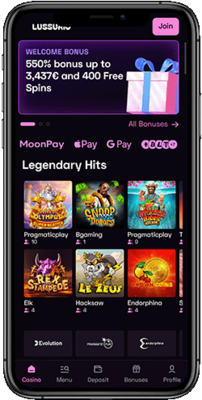
A mobile browser version opens through Safari, Chrome or another current browser, without requiring installation from an app store. This can be convenient because there is no separate download to maintain, and the same website may be available from a phone, tablet or desktop computer. The trade-off is that the experience depends more heavily on the browser, screen size, connection quality and the way the website adapts its menus.
A native application is installed through an official store or a verified installation process. It may offer an icon on the home screen, device-specific notifications or a more tightly controlled interface. However, an app listing should not be assumed merely because a directory calls a casino “mobile”. The available information identifies browser-based instant play, but does not establish a verifiable iOS App Store or Google Play listing. Readers should therefore treat an app claim as unconfirmed until they can identify an official source.
This distinction also affects security and updates. A browser normally receives website changes automatically, while an application may require store updates and permissions. An unofficial download file can create unnecessary risk, particularly if it asks for broad access to contacts, messages or device storage. For practical purposes, a well-designed mobile website can be sufficient; the key issue is whether its navigation remains understandable and whether account functions work properly on the smaller screen.
Which route makes everyday navigation easier?
Browser access is usually the simpler starting point for occasional use. Entering the website address avoids filling a phone with several casino applications and lets a user compare how the page behaves on different devices. A responsive layout should make important destinations visible without excessive scrolling, including game categories, search, account access, support and any available safer-play settings.
For regular use, the home-screen shortcut can provide some of the convenience associated with an app. On many phones, a browser page can be saved as an icon, although this does not turn it into a native application. The shortcut opens the website in the browser environment, so it remains subject to browser cookies, tabs, updates and connection conditions. Users should check that the saved address is correct before relying on it.
Navigation is easier when categories are labelled in plain language rather than hidden behind several layers of promotional content. The described catalogue includes slots, table games, live dealer content, jackpots and other categories, so a usable mobile menu should help visitors move directly to the area they want. Provider browsing and game search are particularly valuable on a phone, where repeatedly swiping through a large catalogue can be frustrating. If a menu obscures the account or support controls, desktop access may be the better option for administrative tasks.
What should be checked before saving a mobile shortcut?
Start by opening the website manually through a trusted address rather than following a pop-up advertisement. Confirm that the connection indicator shows HTTPS and inspect the address carefully for spelling changes. A shortcut is only useful when it points to the genuine website; saving a lookalike page can make future access less safe and more confusing.
Next, test the areas that matter before committing to mobile-only use. Open the game menu, rotate the phone if needed, check whether text remains readable and see whether the account, support and safer-play controls are easy to locate. The available information lists deposit, wagering, loss, session and time-limit tools, along with cooling-off and self-exclusion options. Their presence should not be assumed to mean every control is equally easy to find on every device.
Use a unique password and avoid saving credentials on a shared phone. Device lock, operating-system updates and multi-factor protection where available add useful layers, while public Wi-Fi should be treated cautiously for account activity. Canada’s Get Cyber Safe guidance offers general advice on protecting accounts and devices; it does not confirm any casino-specific application or security feature. Before installing anything, verify its source and review the permissions it requests.
Where mobile convenience can create friction
A small screen can make important conditions easier to overlook. Promotional details, wagering requirements and excluded game categories may appear below the main offer or inside expandable sections. If a player cannot comfortably read the terms, switching to a larger screen is sensible before accepting a promotion. Browser zoom and landscape orientation can help, but they do not replace clear information.
Account administration may also be less convenient on a phone. The described service uses identity and payment-ownership checks, which can involve government identification, proof of address and evidence connected with a payment method. Photographing documents on a mobile device may be practical, but users should inspect the upload destination carefully and avoid sending sensitive files through unverified messages or unrelated applications.
Support and payment screens deserve particular attention. Live chat and email are listed as support routes, while cashier methods and displayed thresholds can vary by currency, country and account profile. A mobile page may truncate instructions or place important status messages below the fold. Before repeating a transaction, check the account history and confirmation screen. If a withdrawal or verification request is pending, retaining the reference details and contacting the stated support channel is more reliable than repeatedly submitting it.
Choose the format according to the task
There is no universal reason to prefer a downloadable app over a mobile website. Browser access is often appropriate for checking the catalogue, reading terms, reviewing promotions or playing occasionally. It avoids uncertain third-party downloads and works across devices with a current browser. A home-screen shortcut can make repeated visits quicker without suggesting that a native app exists.
A larger screen remains preferable for decisions involving personal information, account restrictions or detailed conditions. Registration requires accurate identity and residence information, and verification can involve several documents. Likewise, reviewing bonus rules, payment requirements or safer-play limits is easier when the full page is visible. Mobile access can be useful for monitoring an account, but convenience should not encourage rushed decisions.
Before settling on a routine, use this practical check:
- Confirm whether the service is a browser website or a verified store application.
- Test navigation to games, account settings, support and safer-play controls.
- Read promotional and payment terms on a screen large enough to show the full wording.
- Use device security, a unique password and cautious handling of identity documents.
- Keep a desktop or tablet available for complex verification and account administration.
This approach separates genuine usability from marketing labels. A mobile-friendly website may meet everyday needs, while an unverified application can introduce avoidable uncertainty. The best choice is the one that leaves the user able to understand the page, find help and control the account without guesswork.
Mobile access questions Canadian users often ask
Is there a confirmed downloadable application?
The available information confirms instant-play access through modern smartphone and tablet browsers, but it does not establish a verifiable iOS App Store or Google Play listing. Treat browser access and a native application as separate options, and avoid installing files from unofficial download pages or links shared without a clearly identifiable source.
Can a browser casino be saved like an app?
Most modern phones allow users to add a website shortcut to the home screen. This creates a convenient icon, but it remains a browser shortcut rather than a native application. The page will still depend on the browser, website availability, cookies and device connection, so the shortcut should not be mistaken for an independently installed app.
Is mobile access suitable for verification?
A phone can be useful for capturing or uploading identity and address documents, but verification may be easier to review on a larger screen. Check the address before uploading, follow the stated requirements and retain confirmation details. If a request remains pending or an account is restricted, contact the listed support channel rather than resubmitting documents repeatedly.